EMT Practice Test

1. Question Content...


Question List

Question1: How can you pass data between workflows?
Options are :

Question2: This is a reliable selector for a dynamic web page: webctrl idx='144' tag='IMG'/ Options are :

Question3: What can the UiPath Robotic Enterprise Framework template be used as?
Options are :

Question4: What represents an example of a full selector?

Question5: How can you delay the Automatic Recording?
Options are :

Question6: In which workflow in the UiPath Robotic Enterprise Framework template is the TransactionNumber global variable incremented by default?
Options are :

Question7: In the Robotic Enterprise (RE) Framework, what is the initial value of TransactionNumber?

Question8: Where should you store the environment settings that are prone to changes?
Options are :

Question9: What type of assets can be stored in Orchestrator?
Options are :
Question10: If a developer wants to use a variable of type UIElement to identify a button in a Click activity, which property must be manually configured during development?

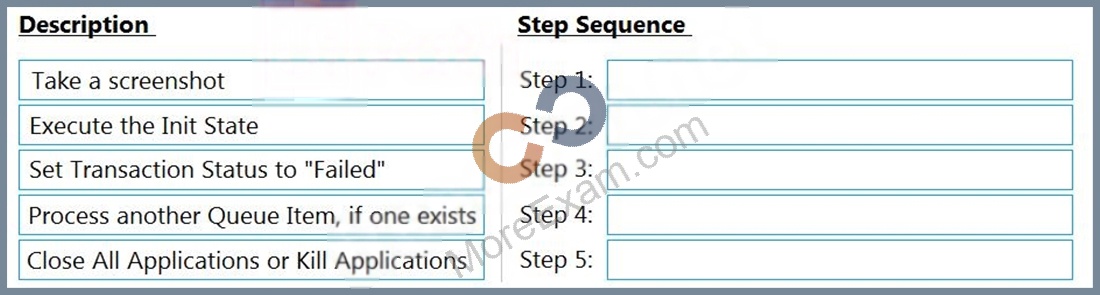
Question11: In a Robotic Enterprise (RE) Framework project that is connected to Orchestrator, what is the correct sequence of steps if an application exception occurs on a Queue Item in the Process Transaction state?
NOTE: Drag the Description found on the "Left" and drop on the correct Step Sequence found on the "Right".

Question12: In this exercise, you will create a UiPath automation that performs the steps below.
To achieve this, you will use the REFrameWork as the starting template and follow the UiPath development best practices.
The solution has to be scalable, so create two separate projects (sub-processes):
- One for the Dispatcher (add to queue);
- Another one for the Performer (consume queue).
Make sure you use a connection to an UiPath Orchestrator for testing.
Here are the steps performed by the Robot in the Dispatcher:
1.Login to https:/Nvww.acme-test.com.
2. On the landing page, Dashboard, click or hover over the Invoices menu item and then click on Search for Invoice. Click on Display All Invoices.
3. Scrape the data from the whole table displayed.
4. For each row in the datatable, Add a queue item containing the Invoice Number, Vendor TaxID and Date.
5. Close ACME System 1.
Here are the steps performed by the Robot in the Performer:
1.Login to https:/Nvww.acme-test.com.
2. For each Queue Item:
- Click or hover over the Invoices menu item and then click on Search for Invoice;
- Type the Invoice Number retrieved from the queue item into the Invoice Number field field;
- Click on Search;
- Extract the values for the Vendor TaxID and Date and compare them with the values from the queue item (check for EXACT match for all fields!);
- If the values are not matching, this should be categorized as a Business Rule Exception, and the queue em should have the status set accordingly;
- If the values match, the transaction is successful.
Note: Navigation can be achieved in multiple ways by the robot - choose whichever you find best.
Constraints to follow in the development, using the REFrameWork:
1. TransactionItem datatype should be a QueueItem. The process should recover and retry 2 times in case of errors in navigation between the Invoice Search and Invoices - Search Results pages. One transaction is the action of navigating to the Invoices Search page, searching for the Invoice Number and scraping the values from the resulting one row table.
2. Create a separate workflow file for the Login to ACME. File input arguments: URL; Username ; Password .
3. Create a separate workflow file for closing ACME.
4. Add the ACME_URL and ACME_Credential to the Excel Config file.
5. Populate lnitAllApplications.xaml from the Framework folder with Invoking the Login to ACt...1E and navigation to the Work Items.
6. Populate CloseAllApplications.xaml from the Framework folder with Invoking the Close ACtv1E.
7.Populate KillAllProcesses xaml from the Framework folder with killing the process used.
8. Populate the Process.xaml file with the following actions:Navigation, Searching for Invoice Number, Scraping, Checking if the values match, Handling the Business Rule Exception.
Important Note: Don't use external file references outside of the project folder (including Orchestrator Assets). Place all the used files within the project folder, zip that folder and upload it to the UiPath Certification Platform.
Zip Al the used workflow files AND the output Excel fife. Then upload the.zip file to the UiPath Certification Platform.
Good luck!
ALL THE BEST!

Question13: How does the Anchor Base activity work?
Options are :

Question14: What is the best way of scraping a large, selectable text in a Citrix environment?
Options are :

Question15: When fine-tuning a dynamic selector, how many characters does "*" replace?

Question16: Where should credentials be stored? Select all the options that apply.
Options are :

Question17: A developer automates a process which has an Excel file as input data; however, Orchestrator is not available. As a result, the developer needs to adapt the Robotic Enterprise (RE) Framework for use with tabular data.
Based on UiPath best practices, where should the Excel file be read and stored in a global DataTable variable?

Question18: The return value of the Get Transaction Item activity is of the following type:
Options are :

Question19: Which of the following types of variables can be defined in UiPath Studio?
Options are :

Question20: How can a string variable called myString be converted to an all-capitals representation for future use?
Options are :

Question21: What are the functions of the Outline panel?
Options are :

Question22: What robots can be selected when you start a job from Orchestrator?
Options are :

Question23: During the development of a process, a certain label text must be retrieved. After retrieving the text, a button must be clicked and the following occurs:
1. The loading of the label text element takes longer than 30 seconds.
2. The loading of the button takes longer than 30 seconds.
3. The retrieving of the data or clicking the button must be tried until successful.
Based on UiPath best practices, what must the developer use to ensure that an error is thrown if the label text or the button element does not load?

Question24: The String.Format("Input ={0} and Output = {0}", "1","2") expression returns the following:
Options are :

Question25: Where can the logging level of a robot be changed from?
Options are :

Question26: Where can you trigger an unattended robot from? Select all the options that apply.
Options are :

Question27: You want to automate a process on the https://acme-test.uipath.com/work-items web page. On this page, the following table is displayed:

You observe that the selector of the element highlighted in red is:
<html app='chrome.exe' title='ACME System 1 - Work Items' />
<webctrl tag='TABLE' />
<webctrl tag='TD' tableCol='2' tableRow='2' />
What is a valid selector to get the 5-th element in the WIID column?

Question28: What robot state is displayed on the Robots page while a job is being executed?
Options are :

Question29: Which statement about the UiPath Robotic Enterprise Framework template is false?
Options are :

Question30: Which of the following are required to have efficient execution of automation projects?
Options are :

Question31: What are the recording profiles are available in UiPath Studio?
Options are :

Question32: You are developing a .xaml file to interact with multiple fields of a web page. You want to Auto Empty the fields that require input.
Which input method(s) will automatically empty the target input fields?

Question33: In this exercise, you will create a UiPath automation that performs the steps below.
To achieve this, you will use the REFrameWork as the starting template and follow the UiPath development best practices.
Here are the steps performed by the Robot:
1. Log in to https://www.acme-test.com.
2. On the landing page, Dashboard, click on the Work items menu item. Scrape the data in all the pages of the table, page by page, ensuring error handling and recovery.
3. For each page:
- Filter the records where Status is 'Open';
- Filter the records where Type is 'WI5';
- Filter the records where WIID is less than 500000;
- Append the resulting datatable into an Excel worksheet; you shouldn't worry about the headers and format of the output file.
Constraints to follow in the development, using the REFrameWork:
1. TransactionItem datatype should be a String. The process should recover and retry in case of errors in navigation between WorkItems page. One transaction is the action of scraping one web page.By navigating to the next page, the next transaction will execute. (Same as ACME Process 4 Dispatcher from the UiPath Academy).
2. Create a separate workflow file for the Login to ACME. File input arguments: URL ; Username ; Password .
3. Create a separate workflow file for closing ACME.
3. Add the ACME_URL and ACME_Credential to the Config file.
4. Populate InitAllApplications.xaml from the Framework folder with Invoking the Login to ACME and navigation to the Work Items.
5. Populate CloseAllApplications.xaml from the Framework folder with Invoking the Close ACME.
6. Populate KillAllProcesses.xaml from the Framework folder with killing the process used.
7. Populate the Process.xaml file with the following actions: Web scraping, Filtering and Appending to Excel.
Important Note: Don't use external file references outside of the project folder (including Orchestrator Assets). Place all the used files within the project folder, zip that folder and upload it to the UiPath Certification Platform.
Zip ALL the used workflow files AND the output Excel file. Then upload the .zip file to the UiPath Certification Platform.
Good luck!
Options are :
ALL THE BEST!

Question34: Which of the following statements is true regarding Lists and Arrays?
Options are :

Question35: In the UiPath Robotic Enterprise Framework template, in the Main workflow, the State Machine includes the following states:
Options are :

Question36: Which is the best way to navigate to a specific page in a Web Browser?
Options are :

Question37: Uipath Certification Question Set 6
In the UiPath Robotic Enterprise Framework template, where can the GetAppCredentials workflow retrive credentials from?
Options are :

Question38: A developer created a custom rule for Workflow Analyzer and wants to make it available only at the project level.
Which action should the developer perform?

Question39: The String.Format("Input = {0} and Output = {0}", "1","2") expression returns the following:
Options are :

Question40: A new blank project only has the Main.xaml file and consists of a single Throw activity. The activity is not enclosed in a Try Catch activity.
If this process is published and run from Orchestrator, what is the expected result?

Question41: What layout should be used for UI navigation and data processing?
Options are :

Question42: A developer wants to design a process in which multiple decision points will be used to accommodate complex scenarios.
In UiPath Studio, which recommended type of workflow meets this requirement?

Question43: Consider three GenericValue variables, var1 with the default value of "3 apples", var2 with the default value of "5 mangos", and the result, which is the output of an Assign Activity with the var1 + var2 expression. What is the value of the resulting variable Options are :

Question44: In the UiPath Robotic Enterprise Framework template, if a System Error is encountered in the Process Transaction state of the Main workflow, which state is executed next?
Options are :

Question45: How can you find all anchor elements in a web page?
Options are :

Question46: Which of these are workflow types available in UiPath Studio;
Options are :
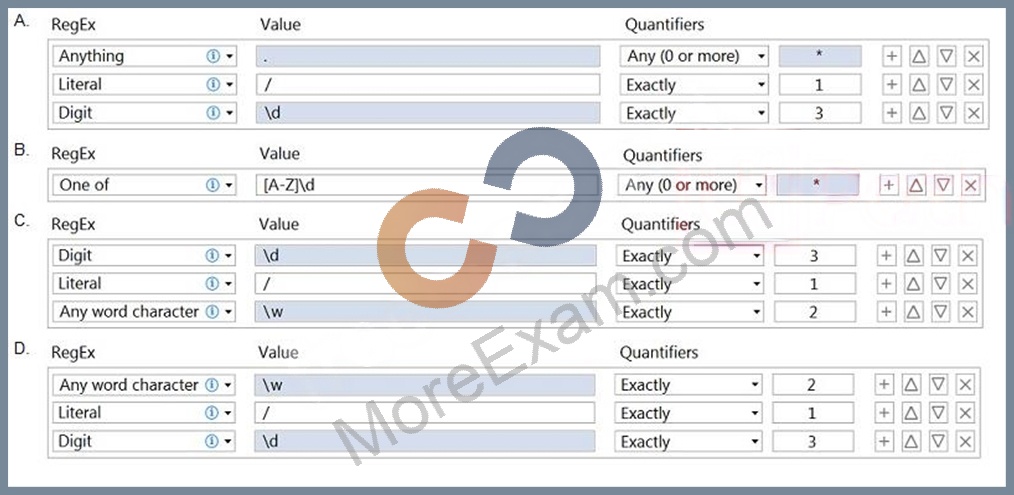
Question47: A developer needs to automate a process which involves capturing support ticket numbers from the email subject line. For example, the email subject line includes: "Action Required - XA/135" where "XA/135" is the ticket number. The robot should validate the pattern of the ticket number before proceeding.
Which expression exclusively matches the ticket number pattern from the subject line?

Question48: What recording wizard would you use to automate UI interactions in an application that does not offer support for selectors?
Options are :

Question49: What happens if the result of a transaction is not set?
Options are :

Question50: It is possible to write to a text file without using the Write Text File activity?
Options are :

Question51: What are the uses of web scraping in UiPath?
Options are :

Question52: Which of the following statements are true? Select all the options that apply.
Options are :

Question53: What happens if the ClickBeforeTyping property in a Type Into activity is selected?
Options are :

Question54: You have two variables, varA and varB, as shown in the following exhibit:

What is the output of the Write Line activity?

Question55: Is there any way to hide the execution of one activity in the logs?
Options are :

Question56: In which types of variable can you store text?
Options are :

Question57: How can you provide more details to explain the purpose of the activities in a workflow?
Options are :

Question58: A developer wants to ensure that a process they are developing includes coherent logs with meaningful log messages. During the execution of the process, an application exception is caught and stored in a local variable called exception.
Based on UiPath best practices, how should the Log Message activity in the Catch section of this exception be configured?

Question59: How should exceptions be handled? Select all the options that apply.
Options are :

Question60: What activity can you use to get a column value from a specific row of a DataTable?
Options are :

Question61: Scheduling a process is done from:
Options are :

Question62: How can a robot start an application in Citrix?
Options are :

Question63: Which activity provides the easiest way to loop through all the rows in a DataTable?
Options are :

Question64: Is it possible to write to a text file without using the Write Text File activity?
Options are :

Question65: A developer is adding a Log Message activity in an Exit section of a single state within a state machine. When will the Log Message activity in the Exit section be executed?

Question66: The String.Format("Input = {0} and Output = {1}", "1","2") expression returns the following text:
Options are :

Question67: What type of Output variable do all Get Mail activities return? (POP3, IMAP, Outlook, Exchange) Options are :

Question68: Is it possible to reprocess a transaction in a Queue after its failure due to an application exception?
Options are :

Question69: What type of argument can you define to pass data and retrieve the modified value from an invoked workflow?
Options are :

Question70: In UiPath Studio, what describes project validation and workflow analysis?

Question71: What status does a job have when a schedule is triggered in
Orchestrator, but there are no available robots to execute it?
Options are :